

Coin Game
Lesson 13: Coin game revisited: meet Actor
Refactor the Coin game using actors and contact.
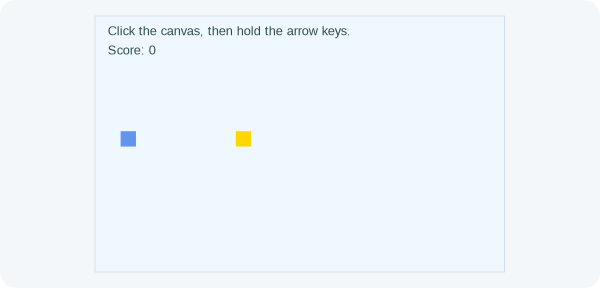
Turn the player and coins into actors while keeping the score, winning and Restart.
Open your existing Coin game project. This lesson needs a project whose
Zero library includes Actor.touches(Actor); an older Coin project may not have
that method yet. Use a project with the matching Actor library before continuing.
This exercise replaces Main.java, Player.java and Coin.java in two
working stages. It keeps movement, three coins, scoring,
winning and Restart, but resets the canvas to 640 × 360 and uses arrow keys and
a plain score label. The earlier PlayerInput, ScoreDisplay, badge, optional
WASD, artwork, sound and scrolling are not used by this version. Their other
files remain in your project. Your committed original stays on main; after the
exercise, use it as a reference to bring back any features you want.
1. Start a branch for this change
Start from a working checkpoint you committed and synced on main. In the Project panel, click the current branch name, main, then choose:
New branch…
Enter actor-refactor and press Enter. Check that actor-refactor appears as
the current branch before continuing.
2. Give Player an Actor
Replace java/Player.java with this class. extends Actor gives Player a centre,
size, movement and drawing helpers. super(x, y) sets its centre; setSize
sets its 24 × 24 hitbox. In draw, (0, 0) is the centre of the actor, so
(-12, -12) starts the square at its top-left corner. The touches method
lets the existing Coin check contact until you convert it in step 4.
import zero.Actor;
import zero.Color;

public class Player extends Actor {
    public Player(double x, double y) {
        super(x, y);
        setSize(24, 24);
    }

    public void steer(int horizontal, int vertical, double seconds) {
        move(horizontal * 180 * seconds, vertical * 180 * seconds);
        setPosition(Math.max(12, Math.min(x(), 628)), Math.max(12, Math.min(y(), 348)));
    }

    public boolean touches(double coinX, double coinY, double coinSize) {
        return x() + 12 >= coinX && x() - 12 <= coinX + coinSize
                && y() + 12 >= coinY && y() - 12 <= coinY + coinSize;
    }

    @Override public void draw() {
        fill(Color.rgb(100, 149, 237));
        rect(-12, -12, 24, 24);
    }
}
3. Run the game with an Actor player
Replace java/Main.java with this version. Keep your existing Coin.java
for this checkpoint. Main calls the player's steer, update and drawing
methods while the coins still use their existing contact and drawing code.
import zero.Color;
import zero.GameApp;
import zero.Key;
import zero.ui.Button;
import zero.ui.Label;
import zero.ui.Row;

public class Main extends GameApp {
    private Player player;
    private Coin[] coins;
    private int points;
    private boolean won;
    private Label scoreLabel;
    private Label message;

    @Override public void settings() { size(640, 360); }

    @Override public void setup() {
        scoreLabel = new Label("");
        message = new Label("");
        Button restartButton = new Button("Restart");
        restartButton.onClick(() -> restart());
        controls(new Row(12, scoreLabel, message, restartButton));
        restart();
    }

    public void restart() {
        player = new Player(52, 192);
        coins = new Coin[] { new Coin(220, 180), new Coin(420, 80), new Coin(540, 300) };
        points = 0;
        won = false;
        scoreLabel.setText("Score: 0");
        message.setText("Collect all " + coins.length + " coins.");
        showGame();
    }

    @Override public void update(double seconds) {
        if (won) return;
        int horizontal = (keyDown(Key.RIGHT) ? 1 : 0) - (keyDown(Key.LEFT) ? 1 : 0);
        int vertical = (keyDown(Key.DOWN) ? 1 : 0) - (keyDown(Key.UP) ? 1 : 0);
        player.steer(horizontal, vertical, seconds);
        player.update(seconds);
        for (Coin coin : coins) {
            if (!coin.isCollected() && coin.touches(player)) {
                coin.collect();
                points++;
                scoreLabel.setText("Score: " + points);
            }
        }
        if (points == coins.length) {
            won = true;
            message.setText("You win! Choose Restart.");
        }
    }

    @Override public void draw() {
        background(Color.WHITE);
        for (Coin coin : coins) coin.draw(this);
        draw(player);
    }

    public static void main(String[] args) { launch(args); }
}
Choose Run, click the canvas and use the arrow keys. Check that the blue square stays inside the canvas. Collect a coin, stay there to check it only scores once, then collect the other two and try Restart.
Save your files on actor-refactor, enter Convert Player to an Actor, and choose:
Commit
4. Give Coin an Actor
Replace java/Coin.java with this class. Each coin has its own centre, size and
collection state. A collected coin stops drawing.
import zero.Actor;
import zero.Color;

public class Coin extends Actor {
    private boolean collected;

    public Coin(double x, double y) {
        super(x, y);
        setSize(24, 24);
    }

    public boolean isCollected() { return collected; }
    public void collect() { collected = true; }

    @Override public void draw() {
        if (!collected) {
            fill(Color.GOLD);
            rect(-12, -12, 24, 24);
        }
    }
}
In Main.java, add 12 pixels to each starting coordinate to place the
centres of the coins where their squares were before. In restart(), replace
the coins line with the copied code:
        coins = new Coin[] { new Coin(220, 180), new Coin(420, 80), new Coin(540, 300) };
        coins = new Coin[] { new Coin(232, 192), new Coin(432, 92), new Coin(552, 312) };
In the update() loop, update each coin once and use Actor's contact check.
Replace the matching lines with the copied code:
        for (Coin coin : coins) {
            if (!coin.isCollected() && coin.touches(player)) {
            coin.update(seconds);
            if (!coin.isCollected() && player.touches(coin)) {
player.touches(coin) checks the actors' size rectangles, including touching
edges. It uses the same rectangles if an actor draws a circle or rotates.
Main still collects the coin and updates the score.
In draw(), replace the coin drawing line with the copied code:
        for (Coin coin : coins) coin.draw(this);
        for (Coin coin : coins) draw(coin);
In Player.java, remove the temporary method
touches(double coinX, double coinY, double coinSize), including its body.
Run and check that coins disappear, score once and return on Restart.
Collect all three to check the win message. Save your files, enter
Convert Coin to an Actor, and choose:
Commit
5. Sync, merge and test on main
Stop the game. With actor-refactor selected, choose:
Sync
Wait for Sync to finish. Choose Merge beside the branch name and confirm Merge actor-refactor into main?
Confirm main is selected. Run the merged game and test movement, scoring, winning and Restart.
6. Publish the tested game
Stop the game and open the Run dropdown, then choose:
Publish & open app
Play the published game and try Restart.
Your Coin game uses actors!